VGInterface.com
Search Downloads


Go Back   LoTROInterface > LotRO Stand-Alone Plugins > Action Bars & Main Bar

Category: Action Bars & Main BarTravel Window
Interface Information
Download
D.H1cks's Portal Bug Reports Feature Requests
How do I install this? (FAQ)
Name: Travel Window   Popular!
Author:
Date: 10-21-2012 03:28 PM
Size: 3.95 MB
Version: 10.9
Rate File: 5 out of 5 with 25 votes  
Patch & Add-on List
File Name
Version
Size
Author
Date
Type
1.04
3.80 Kb
03-24-2013 04:47 AM
Patch
1.2
4.23 MB
10-22-2012 11:06 AM
Patch
1.0
3.28 Kb
05-21-2012 04:53 AM
Patch
1.0
3.22 Kb
03-18-2012 03:52 AM
Patch
1.0
3.21 Kb
11-30-2011 04:06 PM
Addon
1
6.60 Kb
07-03-2011 05:16 AM
Addon
1.0
2.94 Kb
04-25-2011 08:00 AM
Addon
1.0
2.22 Kb
12-10-2010 03:27 PM
Addon
1.0
18.40 Kb
11-08-2010 04:18 PM
Addon
Pictures
Click to enlarge 

Views: 0
Size: 40.88 Kb
Dimensions: 801 x 278
Modes
 
Click to enlarge 

Views: 0
Size: 13.57 Kb
Dimensions: 325 x 220
Context Menu
 
Click to enlarge 

Views: 0
Size: 108.56 Kb
Dimensions: 1497 x 574
Options
 
Click to enlarge 

Views: 0
Size: 22.15 Kb
Dimensions: 265 x 539
Folder Layout
 
Description
Travel Plugin
This plugin creates a single window that contains all the available travel skills, including the race, class and reputation skills.

Install
To install, unzip the downloaded file into the C:\Users\{username}\Documents\The Lord of the Rings Online\Plugins folder.

This plugin also requires the Turbine utilities file that is available at:

http://content.turbine.com/sites/lotro/lua/Beta_LuaPlugins.7z


The folders will look similiar to the folder layout screenshot.

NOTE: You can safely merge the DhorPlugins folder with an existing folder if you have one of my other plugins installed. It will not break anything.

Start
To start the plugin, type /plugins load Travel.
To show or hide the window, you can type /travel toggle (or /trav toggle)

The Menu
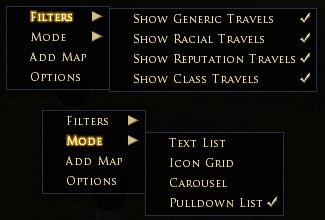
You can right-click almost anywhere on the window to open the context menu for selecting which mode and to filter what type of skills you want to show. You can also open the window for adding your own map home.

General
At the top of the window is a display of how many travel rations you currently have in your inventory.

At the bottom right corner is a slightly lighter box. This is the area where you can grab to resize the window. If we get access to change the mouse cursor, I will remove the box.

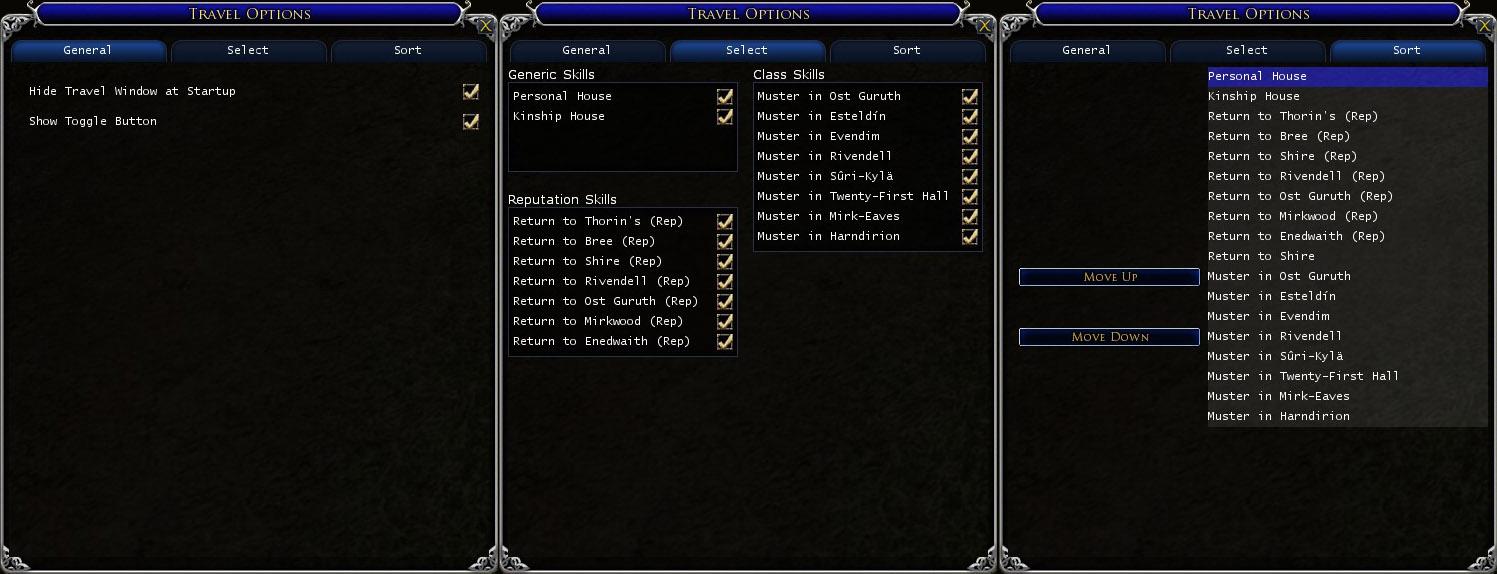
There is also an option for a button to use to toggle the window. This button can be moved by holding down the mouse button for a few moments. Once the icon turns blue, the button can be moved.

Modes

Text List - All the travel skills are listed as text. Click on one to activate the skill.

Icon Grid - Display all the skills displayed as icons in a grid, much like inventory bags.

Carousel - Use your mouse wheel to scroll through your skills. Only the middle icon will actually work.

Pulldown List - All the skills are in a dropdown list. Open the list, select the locations, then click on the icon to go. You can now also set the option to automatically start the travel as soon as you select a location.

Moors Map - If you are playing Creep, you can right click on the button and select 'Open Moor Map' to show a map of the moors and the approximate location for each creep travel skill. Each location is a clickable shortcut.

Map Home
Click on the Add Map selection in the menu. This opens a window with a quickslot and a button.

If you drag your map from your inventory to this quickslot, then press the button, your map home will be saved.

This works for maps to Glan Vraig.

10.9 Changes
- fixed more travel skill code errors
- added skills to Rhovanion map
- added button to option panel and context menu to list untrained travel skills
- removed automatic not trained messages

10.8 Changes
- fixed more travel skill code errors
- fixed issue causing shortcut on pulldown mode to disappear
- all modes should now hide the window when a destination is selected

10.6 & 10.7 Changes
- bug fixes

10.5 Changes
- plugin now detects what skills you have trained (but needs to be improved)
- added new skills

10.3 Changes
- window should appear on top
- added option to hide window when a travel skill is selected

10.1 Changes
- added Eriador and Rhovanion maps, right click and select from the context menu to open them

9.10 Changes
- restored normal Glan Vraig map loading since Turbine Manager appears to be working proplerly now.

9.9 Changes
- added Stangard travel skills (hunter, warden and rep)

9.8 Changes
- added Galtrev Reputation travel skill


Future things.....
Still hope to one day get access to the skills the characters have learned.
The sorting is very basic at the moment, I am thinking different methods of sorting that I might implement.

The Button
I don't really like the icon I have for the button. But, I am not an artist, so for me to make something original is difficult. If anyone out there would like to contribute a tiny bit, and can come up with a 32x32 graphic to use, I would greatly appreciate it. However, I do have a couple of important 'rules' about the icon. It cannot be something taken from the game already, such as an existing button/skill icon. Also, it somehow needs to be related to travel....

Credits
I would like to thank some folks for ideas and help:
Orendar - For a solution to the dropdown list
Frell - For some initial modifications to the dropdown, and ideas for selecting skills
Paulino - For the carousel idea
Rushl - For the request to add a button to toggle the window.
magill - For the folder layout description.
Archive List (Old Versions)
File Name
Version
Size
Author
Date
10.8
3.95 MB
D.H1cks
10-18-2012 06:06 PM
10.7
3.95 MB
D.H1cks
10-17-2012 05:06 PM
10.6
3.95 MB
D.H1cks
10-16-2012 06:39 PM
10.5
3.95 MB
D.H1cks
10-15-2012 06:09 PM
10.3
3.95 MB
D.H1cks
07-15-2012 09:40 AM
10.1
3.95 MB
D.H1cks
05-20-2012 09:37 AM
9.10
612.60 Kb
D.H1cks
03-19-2012 06:00 PM
9.9
612.60 Kb
D.H1cks
03-17-2012 05:42 PM
9.8
612.57 Kb
D.H1cks
03-12-2012 05:12 PM
9.7
611.59 Kb
D.H1cks
01-09-2012 04:20 PM
9.6
611.51 Kb
D.H1cks
01-09-2012 05:42 AM
9.5
611.06 Kb
D.H1cks
12-27-2011 07:45 AM
9.3
610.72 Kb
D.H1cks
12-12-2011 11:24 AM
9.0
605.89 Kb
D.H1cks
11-01-2011 07:31 PM
8.9
55.41 Kb
D.H1cks
10-31-2011 09:04 AM
8.8
55.36 Kb
D.H1cks
10-30-2011 01:01 PM
8.7
55.36 Kb
D.H1cks
10-30-2011 09:14 AM
8.7
55.34 Kb
D.H1cks
10-22-2011 06:51 PM
8.6
54.81 Kb
D.H1cks
10-20-2011 06:06 AM
8.5
54.81 Kb
D.H1cks
09-26-2011 08:24 PM
8.2
53.76 Kb
D.H1cks
04-17-2011 02:49 PM
8.1
53.58 Kb
D.H1cks
04-14-2011 01:16 PM
8.0
53.42 Kb
D.H1cks
03-28-2011 11:54 AM
7.2
52.21 Kb
D.H1cks
03-24-2011 01:04 PM
7.0
52.18 Kb
D.H1cks
02-25-2011 06:21 AM
6.1
46.33 Kb
D.H1cks
12-01-2010 05:01 PM
5.0
41.46 Kb
D.H1cks
10-21-2010 03:31 PM
4.0
40.26 Kb
D.H1cks
09-08-2010 07:20 AM
File Statistics
User Rating:
5 out of 5 with 25 votes
Downloads: 84997
Views: 172567
Favorites: 128
Uploaded By:
 
Last Modified: N/A

View Pictures. Download Now! Post A Comment


Post A Reply
Author Comments Comment Options
Old 05-15-2013, 06:02 PM  
Bamanlron
The Wary

Forum posts: 0
File comments: 2
Uploads: 0
New

Love the add-on, thanks.

In case you missed it there a new Return to Lalia's maket skill with U11. You can buy "Return to Lalia's market" at the dye vendor in Lalia's market in Bree for 3 Mithril coins.
Bamanlron is offline Report comment to moderator   Reply With Quote Reply With Quote
Old 02-08-2013, 09:05 AM  
Thoronmir
The Wary

Forum posts: 0
File comments: 4
Uploads: 0
@Thoronmir: Did you also download and install the Turbine utilities?

Um, yeah ... /smackhead. I finally figured that out yesterday. Once I got the Turbine utilities in the right folder, it started working fine. Was tempted to just delete my post, but chose to leave it up to (a) memorialize my shame and (b) serve as a reminder to anyone else who forgets that very important step.

Thanks for the response.
Thoronmir is offline Report comment to moderator   Reply With Quote Reply With Quote
Old 02-08-2013, 02:14 AM  
Neumi
The Wary

Forum posts: 0
File comments: 9
Uploads: 0
About the "unlearned" skills.

It's not the plugin which is buggy bug I think it's the game itself. Since the latest game update several travel skills get transmitted with the wrong name.

I only know a few which are wrong.
1. (DE) Bree reputation port
2. (DE) Snowbourn reputation port
3. (EN) Bree race port


Please add an option to DEactivate the automatism which hides travel skills when they are not learned, of course then we have to chose manually what we want to display.

I edited your script on my girlfriends computer to remove the "learned" check, but I am sure others would like an option to deactivate it.

It's a great plugin and it's a shame that it's suffering from Turbine's bugs.
Neumi is offline Report comment to moderator   Reply With Quote Reply With Quote
Old 02-08-2013, 02:10 AM  
Neumi
The Wary

Forum posts: 0
File comments: 9
Uploads: 0
@Thoronmir: Did you also download and install the Turbine utilities?

Last edited by Neumi : 02-08-2013 at 02:11 AM.
Neumi is offline Report comment to moderator   Reply With Quote Reply With Quote
Old 02-07-2013, 12:29 PM  
Thoronmir
The Wary

Forum posts: 0
File comments: 4
Uploads: 0
I usually play LOTRO on my desktop, but upcoming business travel induced me to buy a new gaming laptop to take on the road. The Travel plugin works great on the desktop. I tried downloading it for the laptop yesterday and cannot get the LOTRO game to load it.

Both computers have nearly identical specs and both use Windows 7. I have checked the folders on both, and the plugin (and related items) appear in precisely the same place on each machine: ... /lord of the rings/plugins.

The Plugins Manager feature at the LOTRO character log-in screen on the laptop shows "Travel (10.9)" as an available pugin. I have tried to activate the auto-load function, but the Travel plugin never loads. I have tried to manually load (i.e., /plugins load travel) the Travel plugin while logged into a character, but it never works. While logged, I see "Travel (10.9)" as an available plug-in when I type: /plugins list. The message I always get when I try to load it, however, is: "Unable to load Travel."

I am fairly certain this is a "Me" problem and not a "You" problem. But I have run out of ideas of things to check and double-check to make this work. There must be some aspect of loading the plugin that I have overlooked, but I cannot figure this out.

Any guidance anyone can offer would be appreciated.
Thoronmir is offline Report comment to moderator   Reply With Quote Reply With Quote
Old 01-21-2013, 01:10 AM  
Neumi
The Wary

Forum posts: 0
File comments: 9
Uploads: 0
édit: removed, it was nonsense

Last edited by Neumi : 02-08-2013 at 02:16 AM.
Neumi is offline Report comment to moderator   Reply With Quote Reply With Quote
Old 01-02-2013, 10:16 AM  
Neumi
The Wary

Forum posts: 0
File comments: 9
Uploads: 0
While the english version 10.9 works fine on a english client, the german version 10.9 reports the skill "return to snowbourn" as untrained on a german client, even if the skill was learned a few days ago.
Neumi is offline Report comment to moderator   Reply With Quote Reply With Quote
Old 12-26-2012, 06:05 PM  
Vald
The Undying
 
Vald's Avatar

Forum posts: 22
File comments: 57
Uploads: 0
Would you be able to add the ability to have the travel locations show the name or allow us to edit them and add the name? I have to hover over many "Return Home 11", "Return Home 12" etc. to see where they actually go.
Vald is offline Report comment to moderator   Reply With Quote Reply With Quote
Old 11-26-2012, 03:20 AM  
Tangaar
The Wary
 
Tangaar's Avatar
Interface Author - Click to view interfaces

Forum posts: 0
File comments: 51
Uploads: 1
Dont forget on your next update to switch the moors map good trr to poor tr and vice versa, forgot to mention earlier
Tangaar is offline Report comment to moderator   Reply With Quote Reply With Quote
Old 10-26-2012, 03:56 PM  
D.H1cks
The Undying
 
D.H1cks's Avatar
Interface Author - Click to view interfaces

Forum posts: 161
File comments: 145
Uploads: 8
You have this option since the 10.3, now it's automatic


Quote:
So i cant disable it now? thanks
Don't worry, I have plans to allow it to be disabled, just need to get some time to put in the code. As someone stated before, the variable to save the setting is already there, just the code to implement it is not.
D.H1cks is offline Report comment to moderator   Reply With Quote Reply With Quote
Old 10-26-2012, 09:41 AM  
Tangaar
The Wary
 
Tangaar's Avatar
Interface Author - Click to view interfaces

Forum posts: 0
File comments: 51
Uploads: 1
You have this option since the 10.3, now it's automatic


So i cant disable it now? thanks
Tangaar is offline Report comment to moderator   Reply With Quote Reply With Quote
Old 10-26-2012, 02:15 AM  
ardinendlil
The Wary
Interface Author - Click to view interfaces

Forum posts: 0
File comments: 5
Uploads: 1
You have this option since the 10.3, now it's automatic
ardinendlil is offline Report comment to moderator   Reply With Quote Reply With Quote
Old 10-25-2012, 03:52 AM  
Tangaar
The Wary
 
Tangaar's Avatar
Interface Author - Click to view interfaces

Forum posts: 0
File comments: 51
Uploads: 1
Hi...on 10.9 when i choose a travel the window disapears :x

I never had that thingy again in any version so far, only 10,9
Tangaar is offline Report comment to moderator   Reply With Quote Reply With Quote
Old 10-24-2012, 02:04 PM  
D.H1cks
The Undying
 
D.H1cks's Avatar
Interface Author - Click to view interfaces

Forum posts: 161
File comments: 145
Uploads: 8
Quote:
Hello,

I've got a problem : All the personal return are up even if i don't purchase them.

( got the french client )

Thx for your work
Unfortunately, the way the milestone skills work there is no way I can currently check if you have them trained or not. So for now you will have to manually disable the ones you dont have trained.
D.H1cks is offline Report comment to moderator   Reply With Quote Reply With Quote
Old 10-24-2012, 07:03 AM  
ardinendlil
The Wary
Interface Author - Click to view interfaces

Forum posts: 0
File comments: 5
Uploads: 1
Hello,

I've got a problem : All the personal return are up even if i don't purchase them.

( got the french client )

Thx for your work
ardinendlil is offline Report comment to moderator   Reply With Quote Reply With Quote
Post A Reply

 
Category Jump:
Search this Category:
 

All times are GMT -5. The time now is 11:27 PM.


Our Network
EQInterface | EQ2Interface | Minion | WoWInterface | VGInterface | LoTROInterface | MMOInterface | Swtorui